
Guide · Lead follow-up
Video follow-up for contractors: what to record after the estimate, how long, and how to send it with consent
One short, personal video after the estimate: what a roofer, remodeler or tree service should say, how long it should run, how to record it on a phone, how to send it (texts only with consent), what never to show of the homeowner's house, and how to judge it by signed jobs.
The short answer
A follow-up video is one short recording, about a minute, sent after the estimate. Recap the visit, answer the one open question and name the next step. Record it on your phone away from the house, send it by email, or by text only if the homeowner agreed to texts, and never reuse it in ads without written consent.
Key takeaways
- One optional step inside your follow-up plan, not a new plan.
- Three parts: what you saw, the one open question, the next step. About 60–90 seconds.
- Record in your truck, not at the curb. Email by default; texts only with consent.
- The video of the homeowner's house is private and never reused in ads without written consent.
- Judge it by signed jobs ÷ estimates sent, with and without a video.
Want us to find your three biggest lead leaks?
Free Growth DiagnosisShould you send a video after the estimate?
It can help, as one step inside the follow-up plan you already run. A homeowner who saw three estimates may remember the person who explained theirs. That is a reason to try it, not a promise; measure it (see the last section).
The plan itself, with the timing and the written scripts, is in our trade guides: roofing estimate follow-up, remodeling proposal follow-up and tree service estimate follow-up. The video replaces or joins one message in that plan. Send it once, usually the same day or the day after the estimate. Agree at the visit how you will follow up, as a roofing sales coach puts it: "set the follow up while you're in the home."
Send a second video only if the homeowner asks something that is easier to show than to write. Never a series of videos.
Skip the video for storm or emergency jobs (call), for homeowners who asked for email only or no texts, and when the question is the price or something needs a signature (put it in writing).
One note for tree services: some tree companies ask homeowners to send them a video of the tree for a first look. That is the other direction, the photo-quote step; see "Photo quote or site visit" in our tree service estimate follow-up guide.
What should you say in the video?
Three parts, in this order:
- Recap the visit in their words. What you saw and what they asked for.
- Answer the one open question. The thing they hesitated on at the visit.
- Name the next step. One date or one choice.
That matches common sales-coach advice: thank them, one specific detail, what happens next, an open door for questions. The same coach advises "face to camera in a personal, short, fast-paced video".
Three things stay out: other companies (never name another contractor or their visit), scare lines (no "code violations" or "warranty risks" to push a decision), and price talk (if the price is the question, say you will answer it in writing).
Roofer, after the inspection and estimate
"Hi {first name}, it's {your name} from {Company}. Thanks for meeting me for the roof inspection {today}. You asked about {the soft spot over the garage}. It's in the estimate as {item}, and here's what it means: {one sentence}. Next step: {a short call on Thursday to go over any questions}. If anything comes up before then, reply to my email or call me at {number}."
Remodeler, after the design consult or proposal
"Hi {first name}, it's {your name} from {Company}. Thanks for showing me the {kitchen}. You wanted {an island with seating} and weren't sure about {moving the sink}. The proposal shows {both options}, and the difference is {one sentence}. Next step: {choose a time for the second design meeting}. Questions? Reply to my email or call me at {number}."
Tree service, after the walk-through
"Hi {first name}, it's {your name} from {Company}. Thanks for showing me the {oak by the driveway}. You asked whether {the limb over the roof} can wait. My answer is in the estimate: {one sentence}. Next step: {pick a date that suits you}. Questions? Reply to my email or call me at {number}."
How long should it be?
About 60–90 seconds, and never over 2 minutes. That is our recommendation; we found no study of follow-up videos for homeowners. Sales-video tools commonly advise the same upper limit: "Keep videos under 2 minutes." The three-part script above runs about a minute when spoken. One take is fine; a small stumble sounds like a real person.
How do you record it on a phone?
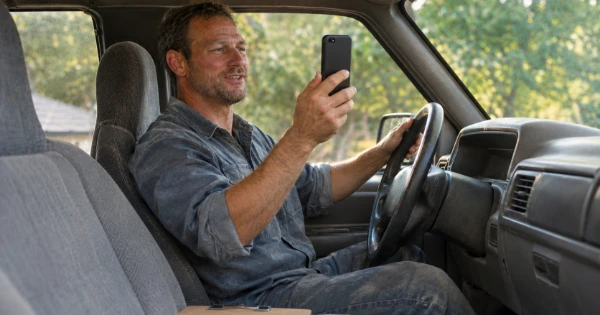
- In your truck after the visit, not at the curb in front of the house. That keeps the house, the street and the neighbors out of the shot.
- Face to camera, phone at eye level, a quiet place, daylight on your face.
- Vertical is fine when the link goes to a phone. One contractor software company advises: "Use the same basic setup every time: vertical orientation, good light, and a steady hand or tripod."
- To show the estimate, a screen recording of the estimate document with your voice is the alternative. Show only that homeowner's estimate.
Should you send it by email or text?
Email by default. Many email apps, Gmail among them, do not play a video inside the email. An email-testing company found that only a few, such as Apple Mail and Thunderbird, do, and recommends "linking to your video" (2024). So send a still image that links to the video, plus one line that says the main point, so the email works even if nobody presses play. Subject: "A 1-minute video about your {roof} estimate".
Text only if the homeowner agreed to texts from you (texts only with consent). The coach says "Yes, you can send this via text. Just keep it short." Before you do, check the consent box on your form. An estimate follow-up text can count as marketing when it pushes the sale; our business texting guide covers the consent line and which kind of text needs which consent. A short text with the link:
"Hi {first name}, it's {your name} from {Company}. I made a 1-minute video about your {roof} estimate: {link}. Reply STOP to opt out."
Say what the link is and who sent it. An unexplained link from a number the homeowner does not know looks like spam.
Never send a video link to a number that came only from a missed call. A missed call is not consent to video links; our guide to missed call automation for contractors covers what that first reply may say (texts only with consent). For the texting rules to check first, see our speed-to-lead guide.
What should you never show? The homeowner's privacy
The video is about the homeowner's house, so treat it as private (our method):
- Leave out the house number, street sign, mailbox name, license plates, family members and children, and neighbors' homes.
- Show the work area only, and only with the homeowner's okay. Never film inside the house without asking.
- Check location before you send. Apple's Personal Safety guide says location coordinates "are embedded into each photo and video", and shows how to turn Location off in the share sheet's Options. Its steps are written for photos, so check the Options button before you send; do not assume every detail is removed.
- Keep the link private. If you upload to a video tool, use a private or unlisted link, not a public page.
- Delete or archive old videos by your own policy.
The follow-up video is never reused in ads, reels or your website without the homeowner's written consent. Some marketing advice says one recording can be cut into a reel, a website clip and a paid ad as well as the estimate follow-up. For a video filmed at a customer's house, that is the practice to avoid. Our customer endorsements guide covers what to check in house photos and how to get written consent. Ad videos are a separate job: our ad videos and images service uses only your own job photos and videos, and real customers only with written consent.
General information, not legal advice.
Which tools can you use?
Three kinds, no brand needed:
| Tool | What it does | Fits when |
|---|---|---|
| Your phone's camera, plus email or text (texts only with consent) | Record, upload, send a link | You send a few videos a week |
| A video-message app | Link page, still image, a "viewed" notice | You send many and want the same look each time |
| The video feature in your CRM or estimating app | Video saved with the lead and the estimate | Your team already works in that app |
A "viewed" notice is a hint for when to call, not a reason to chase. We do not rank tools.
How do you know it works?
Judge it by signed jobs, not views. Tag every estimate in your CRM "video sent: yes" or "no". After a few months, compare signed jobs ÷ estimates sent for each group.
Worked numbers in this guide show the method; they are not real client results. For example: over four months, a roofer sends 40 estimates with a video and 45 without. 12 of the 40 sign, and 11 of the 45. That is one more signed job from the video group, which at these numbers could be chance. Keep counting before you decide.
Our guide to cost per signed job shows how to count by lead source, and tying estimates and signed jobs to their source is part of our call and lead tracking.
Where Digital Hark fits
Digital Hark builds the growth system for home-service contractors: ads in your own accounts, landing pages and forms with a clear consent checkbox, tracking down to signed jobs, and the CRM field and reminders that make a follow-up video easy to tag and count. Your estimator records and sends the video; we never record or send follow-up videos for you, and we never call your leads or sell jobs for you. You own every account, page and lead.
Common questions
Should contractors send a video after an estimate?+
It can help as one optional step in your follow-up plan: a short, personal recap from the person who did the estimate. Send it once, usually the same day or the next, and skip it for emergency jobs, price questions or homeowners who asked for email only. Measure it by signed jobs. Want a live video call before the first visit instead? See how virtual consultations work for remodelers and roofers.
How long should a follow-up video be?+
About 60 to 90 seconds, and never over 2 minutes. That is our recommendation. A three-part script (recap, the one open question, the next step) runs about a minute.
Can I text a video link to a homeowner?+
Only if the homeowner agreed to texts from you on your form (texts only with consent). Say who you are and what the link is, and end the text with "Reply STOP to opt out." A missed call is not consent to video links. Email is the safe default. For the wording on your form, see what a texting consent line should say.
What should I not film at a customer's house?+
The house number, street sign, mailbox name, license plates, family members, children and neighbors' homes, and never the inside of the house without asking. Record your face in the truck, away from the house, and check that location is off in your phone's share options before you send.
Can I use the follow-up video in my ads?+
No, not without the homeowner's written consent. The follow-up video is private to that homeowner. Ad videos are made separately, from your own job photos and videos, with written consent from any customer shown.
What tools do contractors use for video messages?+
Three kinds: the phone's own camera with email or text (texts only with consent), a video-message app with a link page and a "viewed" notice, or the video feature in a CRM or estimating app. Pick the one your team will use every time.


